
iOS开发实战 - 完美解决UIScrollView嵌套滑动手势冲突
本文介绍如何通过改变内外层scrollView的contentOffset来达到子列表页吸顶等自定义悬浮;本文看起来有点长,但是对比其他办法确实是比较简单的,由于时间问题,没有将项目中这一部分的代码整合一个demo,所以我在这里贴出了更多的代码,方便大家阅读,如有疑问或者建议联系作者。
如果想看关于头部放大、分页吸顶效果可移止本文末尾;
先来看一下效果:
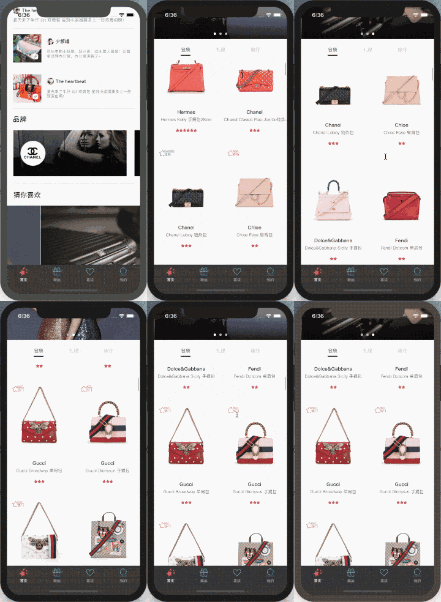
项目实战
案例分析:
1.外层tableView+中间层scrollView+内层collectionView
2.存在滑动冲突的是外层的tableView和内层的collectionView
核心代码:
1.先看外层的tableView处理
1.1 BaseTableView
//注意:下方的tableView是继承自XXHomeBaseTableView,至关重要,目的是让外层tableView接收其他手势
#import "XXHomeBaseTableView.h"
@implementation XXHomeBaseTableView
- (BOOL)gestureRecognizer:(UIGestureRecognizer *)gestureRecognizer shouldRecognizeSimultaneouslyWithGestureRecognizer:(UIGestureRecognizer *)otherGestureRecognizer {
    return YES;
}
@end
1.2 主控制器主要代码:
@interface XXHomeViewController ()<UITableViewDelegate, UITableViewDataSource>
@property (nonatomic, strong) XXHomeBaseTableView *mainTableView;
@property (nonatomic, strong) XXHomeFooterView *footerView;
@property (nonatomic, assign) BOOL canScroll;
@property (nonatomic, assign) BOOL isTopIsCanNotMoveTabView;//到达顶部不能移动mainTableView
@property (nonatomic, assign) BOOL isTopIsCanNotMoveTabViewPre;//到达顶部不能移动子控制器的tableView
@end
- (void)viewDidLoad {
    [super viewDidLoad];
    //注册允许首页外层tableView滚动通知
    [[NSNotificationCenter defaultCenter] addObserver:self selector:@selector(acceptMsg:) name:@"leaveTop" object:nil];
}
#pragma mark 接收通知
- (void)acceptMsg:(NSNotification *)notification{
    NSDictionary *userInfo = notification.userInfo;
    NSString *canScroll = userInfo[@"canScroll"];
    if ([canScroll isEqualToString:@"1"]) {
        _canScroll = YES;
    }
}
#pragma mark 处理联动
- (void)scrollViewDidScroll:(UIScrollView *)scrollView {
    if (scrollView == _mainTableView) {
        //当前偏移量
        CGFloat yOffset  = scrollView.contentOffset.y;
        //临界点偏移量
        CGFloat listHeight = SCREEN_HEIGHT - self.naviBarHeight - self.tabBarHeight - 60;
        CGFloat footerViewHeight = 63 + ReSize_UIHeight(300) + 60 + listHeight;
        CGFloat tabyOffset = scrollView.contentSize.height  - footerViewHeight  + 60 + ReSize_UIHeight(300) - self.naviBarHeight; //外层tableView的偏移量
        //更改状态栏的字体颜色和bounces
        if (yOffset >= tableHeaderViewHeight) {
            scrollView.bounces = NO;
            if (yOffset <= (scrollView.contentSize.height  - footerViewHeight + 60)) {
                [UIApplication sharedApplication].statusBarStyle = UIStatusBarStyleDefault;
            }else{
                [UIApplication sharedApplication].statusBarStyle = UIStatusBarStyleLightContent;
            }
        }else{
            scrollView.bounces = YES;
            [UIApplication sharedApplication].statusBarStyle = UIStatusBarStyleLightContent;
        }
        //解决scrollView嵌套手势冲突问题
        if (yOffset >= tabyOffset) {
            //当分页视图滑动至导航栏时,禁止外层tableView滑动
            _mainTableView.contentOffset = CGPointMake(0, tabyOffset);
            _isTopIsCanNotMoveTabView = YES;
        }else{
            //当分页视图和顶部导航栏分离时,允许外层tableView滑动
            _isTopIsCanNotMoveTabView = NO;
        }
        //取反
        _isTopIsCanNotMoveTabViewPre = !_isTopIsCanNotMoveTabView;
        if (!_isTopIsCanNotMoveTabViewPre && _isTopIsCanNotMoveTabView) {
            NSLog(@"分页选择部分滑动到顶端");
            [[NSNotificationCenter defaultCenter] postNotificationName:@"goTop" object:nil userInfo:@{@"canScroll":@"1"}];
            _canScroll = NO;
        }else {
            NSLog(@"页面滑动到底部后开始下拉");
            if (!_canScroll) {
               NSLog(@"分页选择部分保持在顶端");
               _mainTableView.contentOffset = CGPointMake(0, tabyOffset);
            }
        }
    }
}
#pragma mark 懒加载
- (UITableView *)mainTableView {
    if (!_mainTableView) {
        //初始化最好在tableView创建之前设置(?:如果在tableView创建之后,设置了tableView的contentInset,比如你要头部headerView的放大效果,就会出问题,因为contentInset的设置会调用scrollViewDidScroll这个方法)
        _canScroll = YES;
        _isTopIsCanNotMoveTabView = NO;
        //创建tableView等代码省略...
    }
    return _mainTableView;
}
- (XXHomeFooterView *)footerView {
    if (!_footerView) {
        CGFloat listHeight = SCREEN_HEIGHT - self.naviBarHeight - self.tabBarHeight - 60;
        CGFloat height = 63 + ReSize_UIHeight(300) + 60 + listHeight; //标题区域的高度 + 轮播图高度 + 按钮区域高度 + 列表高度
        _footerView = [[XXHomeFooterView alloc] initWithFrame:CGRectMake(0, 0, SCREEN_WIDTH, height)];
        _footerView.superController = self;
    }
    return _footerView;
}
2.中间层 - footerView,包含中层scrollView(collectionView的容器)和collectionView的创建
为了你们更清晰的看到footerView的具体构建,这里贴出footerView的全部代码,关注内层collectionView和外层tableView滑动手势冲突的小伙伴可移至第三部分
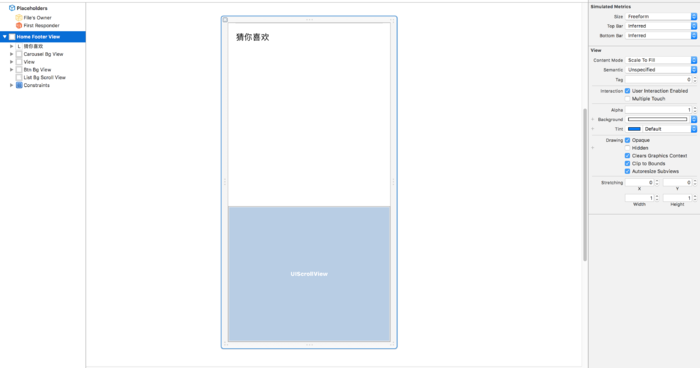
footerView
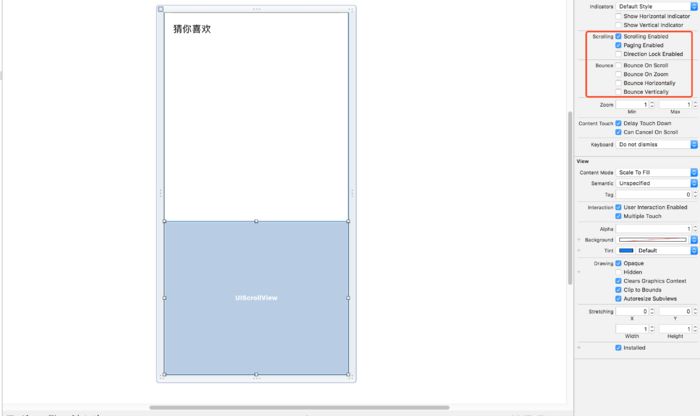
scrollView禁用上下滑动
相关代码:
#import "XXHomeFooterView.h"
#import "YSCommodityDetailsVC.h"
#import "XXHomeGuessLikeListView.h"
#import "XXHomeBaseModel.h"
#import "XXHomeViewController.h"
#define btnWidth 48
#define btnHeight 40
#define carouselViewHeight ReSize_UIHeight(300.0)
@interface XXHomeFooterView () <SDCycleScrollViewDelegate, UIScrollViewDelegate>
@property (weak, nonatomic) IBOutlet UIView *carouselBgView;         //轮播图背景
@property (weak, nonatomic) IBOutlet UIView *btnBgView;              //按钮背景
@property (weak, nonatomic) IBOutlet UIScrollView *listBgScrollView; //商品列表背景
@property (weak, nonatomic) IBOutlet NSLayoutConstraint *listBgScrollViewHeight;
@property (nonatomic, strong) SDCycleScrollView *carouselView; //轮播图
@property (nonatomic, strong) NSArray *btnTitleArr; //按钮title
@property (nonatomic, strong) UIView *line; //btn下滑线
@property (nonatomic, strong) UIButton *lastSelectBtn; //上次选中的btn
//数据
@property (nonatomic, copy) NSArray *carouselDataArr; //轮播图数据
@property (nonatomic, assign) NSInteger currentIndex;  //当前页下标
@end
@implementation XXHomeFooterView
- (instancetype)initWithFrame:(CGRect)frame {
    if (self = [super initWithFrame:frame]) {
       self = [[[NSBundle mainBundle] loadNibNamed:@"XXHomeFooterView" owner:self options:nil] lastObject];
       self.frame = frame;
       self.listBgScrollView.delegate = self;
       [self createUI];
    }
    return self;
}
- (NSArray *)btnTitleArr {
    if (!_btnTitleArr) {
        _btnTitleArr = @[@"包袋", @"礼服", @"旅行"];
    }
    return _btnTitleArr;
}
- (void)createUI {
    //轮播图
    self.carouselView = [SDCycleScrollView cycleScrollViewWithFrame:CGRectMake(0, 0, self.width, ReSize_UIHeight(self.carouselBgView.height)) delegate:self placeholderImage:[UIImage imageNamed:@"XXHome_swiper_botttom"]];
    [self.carouselBgView addSubview:self.carouselView];
    //中间按钮区域
    for (NSInteger i = 0; i < self.btnTitleArr.count; i++) {
        //创建按钮
        UIButton * btn = [UIButton buttonWithType:(UIButtonTypeCustom)];
        btn.backgroundColor = [UIColor clearColor];
        [btn setTitle:_btnTitleArr[i] forState:(UIControlStateNormal)];
        btn.titleLabel.font = NFont(13);
        [btn setTitleColor:[UIColor blackColor] forState:(UIControlStateSelected)];
        [btn setTitleColor:[UIColor colorWithHexString:@"#9C9C9C"] forState:(UIControlStateNormal)];
        [btn addTarget:self action:@selector(btnClickAction:) forControlEvents:(UIControlEventTouchUpInside)];
        btn.tag = 100 + i;
        [self.btnBgView addSubview:btn];
        if (i == 0) {
            [btn mas_makeConstraints:^(MASConstraintMaker *make) {
                make.left.offset(5);
                make.top.offset(10);
                make.width.offset(btnWidth);
                make.height.offset(btnHeight);
            }];
            //初始选中
            btn.selected = YES;
            _lastSelectBtn = btn;
        }else if (i == 1) {
            [btn mas_makeConstraints:^(MASConstraintMaker *make) {
                make.centerX.offset(0);
                make.top.offset(10);
                make.width.offset(btnWidth);
                make.height.offset(btnHeight);
            }];
        }else {
            [btn mas_makeConstraints:^(MASConstraintMaker *make) {
                make.right.offset(-5);
                make.top.offset(10);
                make.width.offset(btnWidth);
                make.height.offset(btnHeight);
            }];
        }
    }
    //下划线
    _line = [UIView new];
    _line.backgroundColor = [UIColor blackColor];
    [self.btnBgView addSubview:_line];
    [_line mas_makeConstraints:^(MASConstraintMaker *make) {
        make.left.offset(15);
        make.top.offset(btnHeight + 5);
        make.width.offset(btnWidth - 20);
        make.height.offset(2);
    }];
    //商品列表页
    _listBgScrollView.contentSize = CGSizeMake(self.btnTitleArr.count * self.width, 0);
    for (NSInteger i = 0; i < self.btnTitleArr.count; i++) {
        XXHomeGuessLikeListView *pageView = [[XXHomeGuessLikeListView alloc] initWithFrame:CGRectMake(i * self.width, 0, self.width,  _listBgScrollView.height)];
        pageView.tag = 200+i;
        [_listBgScrollView addSubview:pageView];
        //item点击的回调
        __weak typeof(self) weakSelf = self;
        pageView.didSelectItemBlock = ^(IOShopListModel *model) {
            //商品详情
            YSCommodityDetailsVC *shopDetail = [[YSCommodityDetailsVC alloc] init];
            shopDetail.shopDetailID = [NSString stringWithFormat:@"%li",model.shopId];
            shopDetail.ppName = @"商品详情";
            [weakSelf.superController.navigationController pushViewController:shopDetail animated:YES];
        };
    }
}
#pragma mark 更新数据
- (void)updateData:(NSDictionary *)dataDic {
    //轮播图
    _carouselDataArr = [dataDic[@"swiper"] copy];
    NSMutableArray *carouselImageArr = [NSMutableArray array];
    for (XXHomeBaseModel  *model in _carouselDataArr) {
        NSArray *imgArr = model.imgs;
        if (imgArr.count > 0) {
            [carouselImageArr addObject:imgArr[0][@"url"]];
        }
    }
    _carouselView.imageURLStringsGroup = carouselImageArr;
    //包袋、礼服、旅行生活
    //包袋
    XXHomeGuessLikeListView *pageView1 = [self viewWithTag:200];
    [pageView1 updateDataWithIds:dataDic[@"handbags"]];
    //礼服
    XXHomeGuessLikeListView *pageView2 = [self viewWithTag:201];
    [pageView2 updateDataWithIds:dataDic[@"fulldress"]];
    //旅行生活
    XXHomeGuessLikeListView *pageView3 = [self viewWithTag:202];
    [pageView3 updateDataWithIds:dataDic[@"travellife"]];
}
#pragma mark 按钮的点击事件
- (void)btnClickAction:(UIButton *)sender {
    //更新按钮状态
    [self updateBtnSAndPageViewStatusWithIndex:sender.tag-100];
}
//更新按钮的状态
- (void)updateBtnSAndPageViewStatusWithIndex:(NSInteger)index {
    //更新按钮下标
    //获取当前btn
    UIButton *sender = [self viewWithTag:index+100];
    //先改变上一次选中button的字体大小和状态(颜色)
    _lastSelectBtn.selected = NO;
    //再改变当前选中button的字体大小和状态(颜色)
    sender.selected = YES;
    //移动下划线
    [UIView animateWithDuration:0.15 animations:^{
        CGPoint point = _line.center;
        point.x = sender.center.x;
        _line.center = point;
    }];
    //更新_lastSelectBtn
    _lastSelectBtn = sender;
    //更新列表页下标
    [_listBgScrollView setContentOffset:CGPointMake(index * _listBgScrollView.width, 0) animated:YES];
}
#pragma mark 列表页结束滑动
- (void)scrollViewDidEndDecelerating:(UIScrollView *)scrollView {
    CGFloat offetX = scrollView.contentOffset.x;
    NSInteger index = (NSInteger)offetX/scrollView.width;
    [self updateBtnSAndPageViewStatusWithIndex:index];
}
#pragma mark SDCycleScrollViewDelegate
/** 点击图片回调 */
- (void)cycleScrollView:(SDCycleScrollView *)cycleScrollView didSelectItemAtIndex:(NSInteger)index {
}
@end
内层collectionView的手势处理
#import <UIKit/UIKit.h>
#import "IOShopListModel.h"
@interface XXHomeGuessLikeListView : UIView
@property (nonatomic, copy) NSArray *dataArray;
@property (nonatomic, copy) void (^didSelectItemBlock)(IOShopListModel *model); //item点击事件的回调
//更新数据
- (void)updateDataWithIds:(NSArray *)ids;
@end
#import "XXHomeGuessLikeListView.h"
#import "ShopCollectionViewCell.h"
#import "BanLiYearCardVC.h"
@interface XXHomeGuessLikeListView () <UIScrollViewDelegate>
@property (weak,  nonatomic) IBOutlet UICollectionView *collectionView;
@property (nonatomic, copy) NSArray *idArray;
@property (nonatomic, copy) NSArray *commodityListArr;
@property (strong, nonatomic) UIScrollView * scrollView;
@property (nonatomic, assign) BOOL canScroll;//是否可以滚动
@end
@implementation XXHomeGuessLikeListView
- (instancetype)initWithFrame:(CGRect)frame {
    if (self = [super initWithFrame:frame]) {
        self = [[[NSBundle mainBundle] loadNibNamed:@"XXHomeGuessLikeListView" owner:self options:nil] lastObject];
        self.frame = frame;
    }
    return self;
}
- (void)awakeFromNib {
    [super awakeFromNib];
    [_collectionView registerClass:[ShopCollectionViewCell class] forCellWithReuseIdentifier:@"ShopCollectionViewCell"];
    //子控制器视图到达顶部的通知
    [[NSNotificationCenter defaultCenter] addObserver:self selector:@selector(acceptMsg:) name:@"goTop" object:nil];
    //子控制器视图离开顶部的通知
    [[NSNotificationCenter defaultCenter] addObserver:self selector:@selector(acceptMsg:) name:@"leaveTop" object:nil];
}
- (void)dealloc {
    [[NSNotificationCenter defaultCenter] removeObserver:self];
}
//接收信息,处理通知
- (void)acceptMsg:(NSNotification *)notification {
    NSString *notificationName = notification.name;
    if ([notificationName isEqualToString:@"goTop"]) {
        NSDictionary *userInfo = notification.userInfo;
        NSString *canScroll = userInfo[@"canScroll"];
        if ([canScroll isEqualToString:@"1"]) {
            _collectionView.showsVerticalScrollIndicator = YES;
            _canScroll = YES;
        }
    }else if([notificationName isEqualToString:@"leaveTop"]){
        _collectionView.contentOffset = CGPointZero;
        _canScroll = NO;
        _collectionView.showsVerticalScrollIndicator = NO;
    }
}
//更新数据
- (void)updateDataWithIds:(NSArray *)ids {
    _dataArray = ids;
    //请求商品列表
    if (_dataArray.count > 0) {
        //将id数组转成字符串
        NSString *idStrs = [_dataArray componentsJoinedByString:@","];
        NSDictionary *dic = @{@"ids":idStrs};
        [YQHttpRequest getData:dic url:@"/commodity/guessLikeCommodityList" success:^(id responseDic) {
            if ([responseDic isKindOfClass:[NSArray class]]) {
                NSArray *dataArr = [NSArray modelArrayWithClass:IOShopListModel.class json:responseDic];
                if (dataArr.count > 0) {
                    _commodityListArr = dataArr;
                    [_collectionView reloadData];
                }
            }else{
//                [MBProgressHUD showError:@"请求列表失败"];
            }
        } fail:^(NSError *error) {
            if (error) {
                [MBProgressHUD showError:@"请求列表失败"];
            }
        }];
    }
}
- (void)scrollViewDidScroll:(UIScrollView *)scrollView {
    if (scrollView == _collectionView) {
        if (!self.canScroll) {
            [scrollView setContentOffset:CGPointZero];
        }
        CGFloat offsetY = scrollView.contentOffset.y;
        if (offsetY <= 0) {
            [[NSNotificationCenter defaultCenter] postNotificationName:@"leaveTop" object:nil userInfo:@{@"canScroll":@"1"}];
        }
    }
}
#pragma mark CollectionView Delegate
- (NSInteger)collectionView:(UICollectionView *)collectionView numberOfItemsInSection:(NSInteger)section {
    return self.commodityListArr.count;
}
- (UICollectionViewCell *)collectionView:(UICollectionView *)collectionView cellForItemAtIndexPath:(NSIndexPath *)indexPath {
    ShopCollectionViewCell *cell = [collectionView dequeueReusableCellWithReuseIdentifier:@"ShopCollectionViewCell" forIndexPath:indexPath];
    if (self.commodityListArr.count > 0) {
        cell.model = _commodityListArr[indexPath.row];
    }
    return cell;
}
- (void)collectionView:(UICollectionView *)collectionView didSelectItemAtIndexPath:(NSIndexPath *)indexPath {
    if (self.didSelectItemBlock) {
        IOShopListModel *model = _commodityListArr[indexPath.row];
        self.didSelectItemBlock(model);
    }
}
#pragma mark FlowLayoutDelegate
- (CGSize)collectionView:(UICollectionView *)collectionView layout:(UICollectionViewLayout*)collectionViewLayout sizeForItemAtIndexPath:(NSIndexPath *)indexPath {
    return CGSizeMake((self.width-10)/2.0, 316);
}
@end
总结:
bounces问题,在联动代码里已经配置,一定要禁用外层tableView底部的bounces,不然会出现在footerView上首次点击事件失效的情况,原因是scrollView嵌套情况下,外层bounces触发后停下来慢,看到内层页面静止了,实则外层scrollView还在调用scrollViewDidScroll,造成滚动事件和点击事件冲突,有兴趣可以打印log看一下;
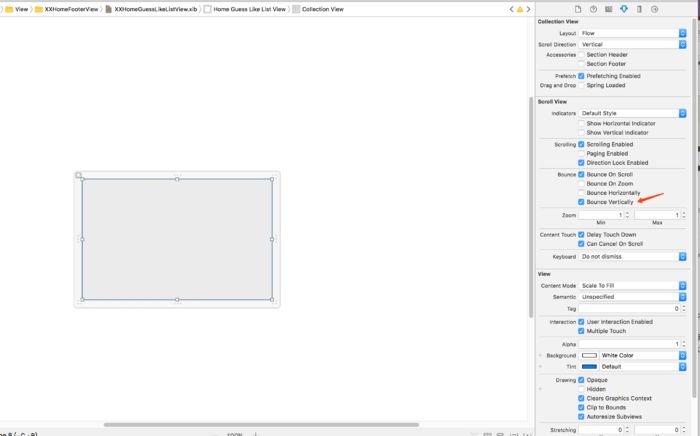
当分页内容未满屏时(cell下方还有空白),此时内层collectionView的bounces是没效果的,可能在当前分页上滑到临界位置时,不能触发外层tableView滑动的通知,解决办法:
这个是collectionView的设置
由于该项目下方分页的都是一样的类型collectionView,并且布局也一样,所以我这里使用了在scrollView上添加collectionView,并没有产出冗余的代码,如果你的业务逻辑稍复杂,可采用子控制器替换直接添加collectionView的方式;
之前我也写过相似的Demo,效果是头部放大,下面分页部分上滑吸顶,也是采用上面这种方式解决滑动冲突,不过还有不同的是里面的分页部分我采用的是子控制器的方式,里面做了很详细的注释;
笔 记 ☜
Demo ☜除了改变contentOffset这种方式,还有没有其他方式可以解决scrollView嵌套手势冲突问题呢?
(1) 没故事的卓同学 - 嵌套UIScrollview的滑动冲突解决方案
(2) 军_andy - iOS 嵌套UIScrollview的滑动冲突另一种解决方案
作者:Metro追光者
链接:https://www.jianshu.com/p/8b87837d9e3a
更多推荐:




相关内容


 微信扫码咨询专知VIP会员